Your meetings, summarized.
Your audio stays on your Mac.
SummarizeRay records and transcribes meetings on your own computer, knows who said what, and writes the report: summary, decisions, action items. One click drafts the follow-up email. Your own AI key; no cloud, no accounts, no subscription.
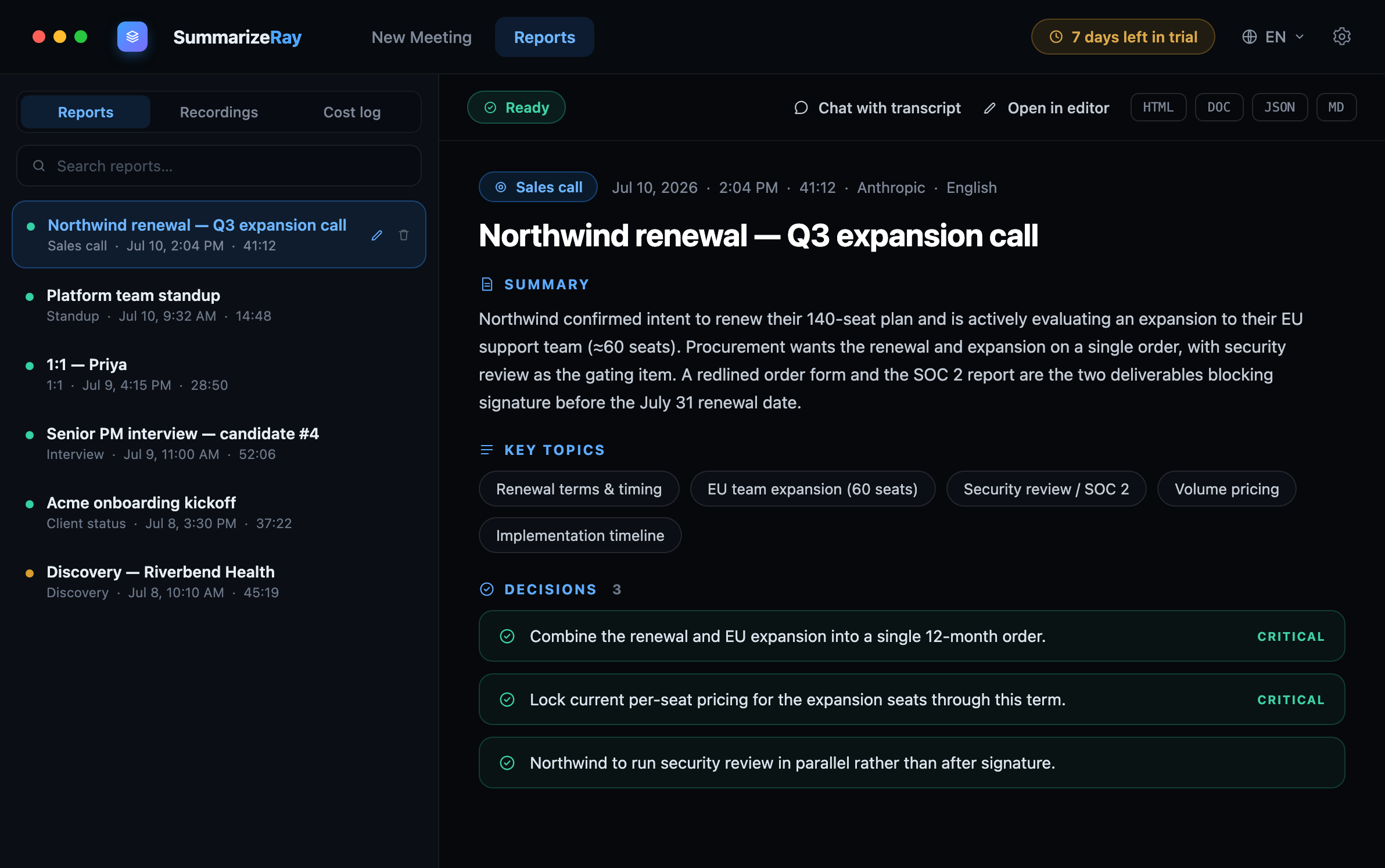
Record. Read. Reply. Done.
Record the meeting, let the AI write the report, then read, ask and finish in seconds. All on your own computer.
Three steps. None of them
touch the cloud.
Record locally
Capture system audio from Zoom, Meet or Teams, or room audio through your mic. Recording is written straight to your own disk.
Transcribe on device
Speech-to-text runs entirely on your computer, no audio file is ever sent anywhere. The result is plain transcript text you control.
Send only the text
Just the transcript goes to the AI provider you choose, under your own API key. You get a structured report back in seconds.
Designed so confidential meetings stay confidential.
Most “AI notetakers” quietly ship your audio to a server you don’t control. SummarizeRay was built the opposite way, local-first by default, with nothing to opt out of.
- By default your audio never leaves your device. Recording and transcription both happen locally, and only the transcript text goes to the AI provider you chose, under your own API key. Want the provider to transcribe too, for better accuracy? That is a switch in Settings, off until you flip it.
- Your key, your wallet. You connect your own provider key and pay them directly, typically a few cents per meeting.
- No accounts, no servers. There’s nothing to sign up for and no SummarizeRay cloud to be breached.
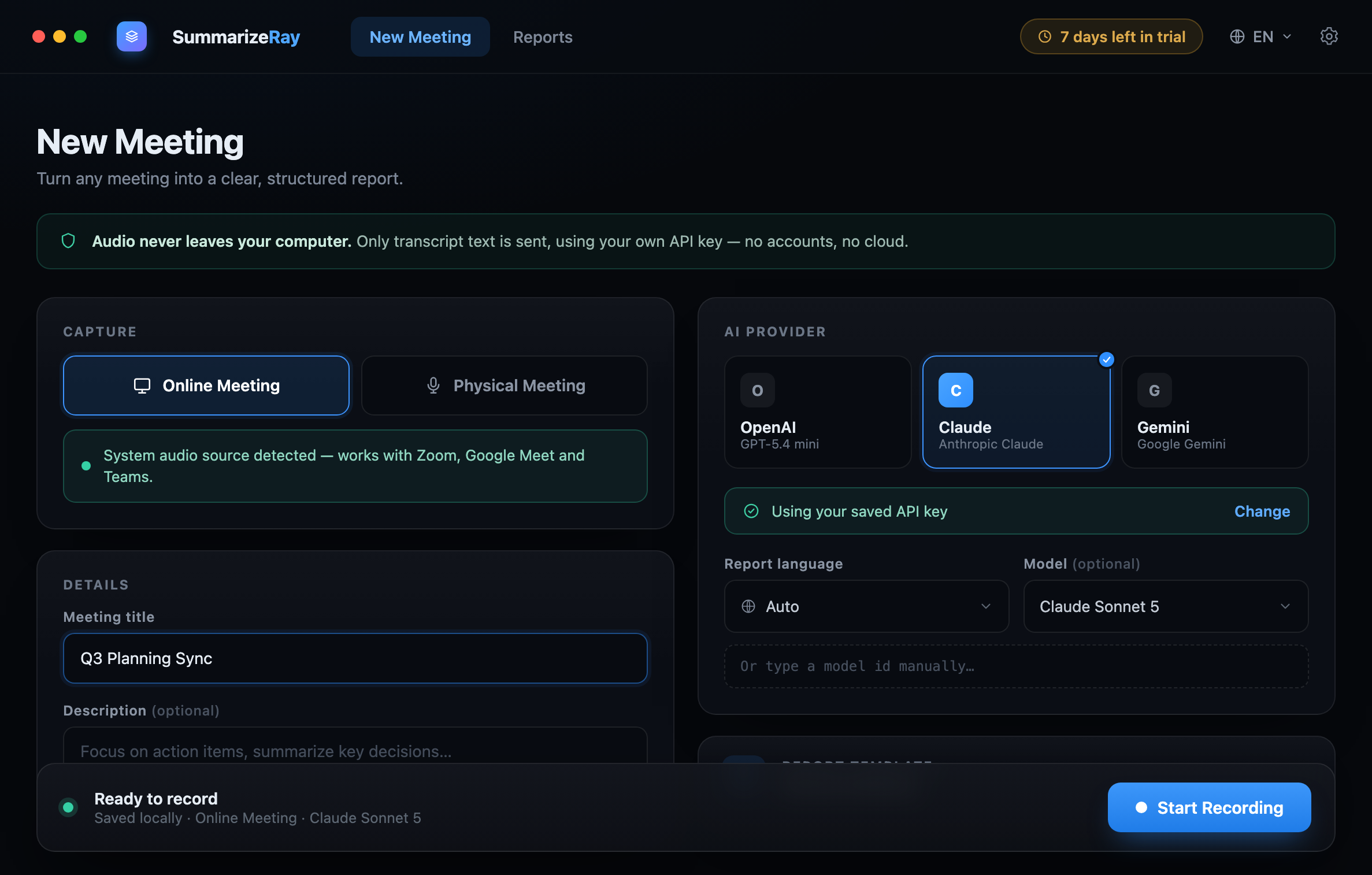
Everything you need to turn talk into action
Dense where it helps, calm everywhere else. SummarizeRay respects your time and your data in equal measure.
System & room audio
Capture your computer’s audio for Zoom, Meet or Teams, or record the room through your mic for in-person meetings.
Bring your own AI
Choose OpenAI, Anthropic (Claude) or Google (Gemini). Your key is stored encrypted on your device and never synced to us.
Structured reports
Summary, key topics, decisions, and action items with owners and due dates, from ready-made templates or your own.
Chat & export
Ask follow-up questions grounded in what was said, then export any report to HTML, Word, JSON, PDF or Markdown.
Knows who said what
Online meetings capture you and the other side separately, so transcripts read Me / Them and action items land on the right person.
One-click follow-up email
After the report, one click drafts a ready-to-send follow-up: decisions, owners, deadlines. Copied straight to your clipboard.
Walk out of the meeting
with the meeting already written up.
SummarizeRay doesn’t hand you a wall of transcript. It reads the conversation and lays out exactly what a busy professional needs to act, scannable, sectioned, and ready to forward.
A report shape for every kind of meeting
Built-in templates tune the AI for the conversation you’re actually having. Make your own in seconds with plain-language guidance.
Sales call
Surfaces budget, timeline, objections and next steps so nothing slips between calls.
Standup
Per-person progress, blockers and commitments, condensed into a forwardable update.
Interview
Signal by competency, standout moments and a balanced strengths / concerns read.
1:1
Themes, growth notes and follow-through items, kept private to you and your report.
Client status
Where the project stands, what was agreed, and the risks worth flagging up the chain.
Your own template
Name it, describe it, and tell the AI what to focus on. Reuse it on every future meeting.
Not another cloud notetaker
The popular meeting bots upload your audio, charge every month, and tie your notes to an account. SummarizeRay does the opposite.
 SummarizeRay
Pay once. Use it forever.
One lifetime license per person. Try it free first, no card, no account.
For one person, across your computers. No renewals, ever. Bring your own AI key and pay the provider directly, usually a few cents per meeting.
- Launch bundle: the first 100 orders include a free CopieRay lifetime license, our clipboard manager
- Unlimited meetings & reports
- On-device recording & transcription
- OpenAI, Anthropic & Google, your key
- Custom templates, exports & transcript chat
- All 6 languages, including full RTL
- Free updates & movable activation
AI runs on cents
Pay your provider directly under your own key, a typical 40-min meeting is about $0.01-$0.05, tracked in a built-in cost log.
Free trial
Try every feature with no card and no account. When the trial ends, one license unlocks it for good.
Move it anytime
One-device activation. Deactivate on your old machine and activate on a new one, your license travels with you.
Questions, answered
No. Recording and transcription happen entirely on your computer. Only the resulting transcript text is sent to the AI provider you choose, never the audio file itself.
You connect your own OpenAI, Anthropic or Google key and pay that provider directly, typically a few cents per meeting. SummarizeRay takes no cut, and a built-in cost log shows exactly what each report cost.
Yes, one lifetime license, no subscription and no renewals. It includes free updates. Activation is tied to one device at a time, and you can deactivate and move it to a new computer whenever you like.
SummarizeRay is a native desktop app for macOS and Windows. It captures system audio from tools like Zoom, Google Meet and Teams, or room audio through your microphone.
No accounts at all. Download the app, use it free, and enter a license key when you’re ready to keep it. There’s nothing to sign up for and no cloud profile to manage.
Nothing is lost. Your recording and transcript are saved locally first, so if a provider call fails you can simply retry or generate the report later, the capture is always safe on your device.
Try SummarizeRay free before you buy.
Download SummarizeRay directly - the free trial starts automatically on first launch. No card, no account, no email.